
The simulator
Project → Simulate Conversation… or F5 opens the simulator on the current conversation. The main window stays usable while it runs.
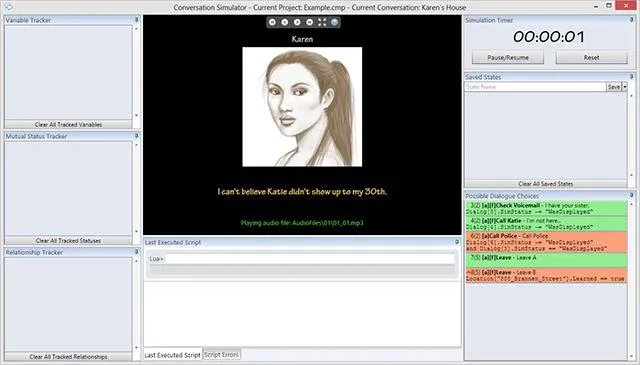
The window
Section titled “The window”| Area | What it shows |
|---|---|
| Control toolbar (top centre) | Navigation and full-screen mode. |
| Stage (centre) | The speaking actor’s picture, the current line in the emphasis colours, and which audio file is playing. With no audio, the line stays on screen for a time computed from its length (see Subtitle speed). |
| Variable / Mutual Status / Relationship trackers (left) | Anything that changes during the run is added to the matching tracker automatically. Remove with the red ×; add by hand with the Track… Lua functions. |
| Last Executed Script / Script Errors (bottom) | The Lua that ran for the displayed node, and any errors. |
| Lua command line (bottom) | Run Lua against the live state. To display a value, write return Variable["points"]. ↑ / ↓ recall history. |
| Conversation Timer (top right) | Elapsed time, with pause / resume / reset. |
| Saved States (right) | Snapshots of every variable and asset field plus your position in the tree. A state is saved automatically each time a menu is shown, which is what makes back possible; name and save your own too. The V button loads only the variables from a state; the play button loads the whole state. |
| Possible Dialogue Choices (bottom right) | Every candidate from the current node: green passed its condition, red failed, with the condition text, its priority, its ID and its group number. This is the pane to read when a choice you expected is missing — and remember priorities compete only within a group. |
Preferences (Tools → Preferences → Simulator Setup)
Section titled “Preferences (Tools → Preferences → Simulator Setup)”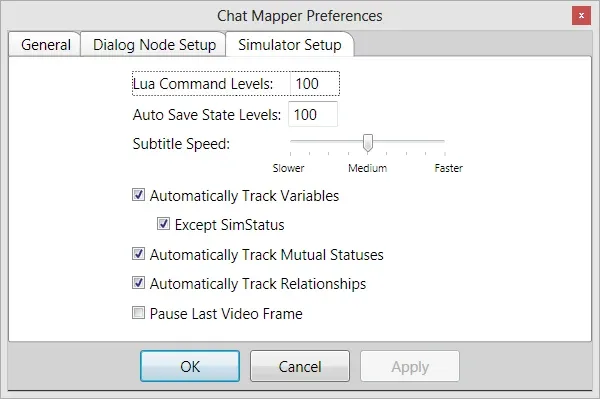
| Setting | Effect |
|---|---|
| Lua command levels | How many command-line entries are kept for ↑ / ↓. |
| Auto save state levels | How many automatic saved states are kept. |
| Subtitle speed | Faster or slower on-screen time for lines with no audio. |
| Automatically track variables / mutual statuses / relationships | Add changes to the trackers without a Track… call. |
| Except SimStatus | Keep SimStatus changes out of the tracker. |
| Text-to-speech (1.8+) | Speak lines that have no audio file. |
Equivalents in ChatMapper Cloud
Section titled “Equivalents in ChatMapper Cloud”The Cloud simulator has the transcript, the
Variables panel, the Lua console (no return needed), and step back /
forward in place of saved states. It does not yet show the
possible-choices pane with condition results, or track mutual statuses and
relationships; query them in the console.