
Import, export and tools
Exporters (File → Export)
Section titled “Exporters (File → Export)”| Export | Notes |
|---|---|
| Chat Mapper Package (CMPKG) (Commercial) | The project plus every media file in one compressed archive, for sharing with another author. |
| As Chat Mapper 1.3 / 1.5 Project | A .cmp readable by that older version. |
| Project As XML (licence) | The most versatile: assets, dialogue, conditions and scripts in one human- and machine-readable file. See ChatMapper XML. For re-import anywhere, enable Export empty fields to XML and export all custom fields. |
| Project As JSON (licence) | The same data as JSON, for web and JavaScript consumers. See JSON format. |
| Screenplay as RTF (licence) | The script view as an editable word-processor document. The Advanced RTF exporter can include every conversation. |
| Project Data to Excel | Every field of every asset, including custom fields, to .xlsx — editable and re-importable. |
| Dialogue Graph as PDF / JPEG / PNG | The tree exactly as drawn. |
| Custom exporters (Commercial) | Written with the Exporter Development Kit supplied with the licence; they appear at the foot of the list. |
Importers (File → Import)
Section titled “Importers (File → Import)”| Import | Notes |
|---|---|
| Chat Mapper Package (CMPKG) | Unpacks to My Documents → Imported Projects and opens. |
| Project Data from Excel | Updates existing assets from a sheet exported earlier. It cannot create new assets. |
| New Project from XML | A new project from ChatMapper XML — from a previous export or a third-party tool that writes the format. Works best when the XML was exported with empty fields and all custom fields included. |
Command-line tools (Commercial)
Section titled “Command-line tools (Commercial)”Batch-export projects without opening the GUI:
"C:\Program Files\Chat Mapper\Chat Mapper.exe" [command] [outputFolder] [inputFiles][command]is-xml,-excel,-rtfor-csv, or a custom exporter’s title lower-cased with spaces as dashes (-my-custom-exporter).[inputFiles]is a comma-separated list of.cmppaths; quote any path with spaces.
Audio File Placer (Tools → Audio File Placer)
Section titled “Audio File Placer (Tools → Audio File Placer)”Bulk-attach recordings to nodes from a folder, matching by filename. Three conventions are recognised:
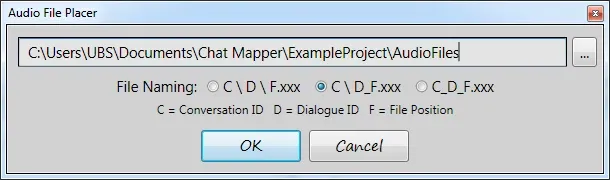
| Organisation | Pattern | Example → conversation 3, node 2, position 5 |
|---|---|---|
| Folder | <conv>\<node>\<pos>.ext | 003\002\005.mp3 |
| Folder/file hybrid | <conv>\<node>.ext or <conv>\<node>_<pos>.ext | 003\002_005.wav |
| File | <conv>_<node>.ext or <conv>_<node>_<pos>.ext | 003_002_005.wav |
Position is the file’s index in the node’s Audio Files list, which
pairs with the |-split segments of the dialogue. Desktop plays any format
Windows Media Player can. To preview, Right-click → Play Audio on a node.
This naming scheme is the one to ask a studio for whichever editor you use — the Cloud media page recommends the same.
Retired: HTML Preview and Publish
Section titled “Retired: HTML Preview and Publish”Version 1.9 added HTML Preview (run the conversation in a local browser)
and Publish (upload a .cmpkg to the play.chatmapper.com hosted player,
which is no longer maintained). ChatMapper Cloud’s Play mode and player link
and the standalone HTML player replace both.